Why AI needs a plan.
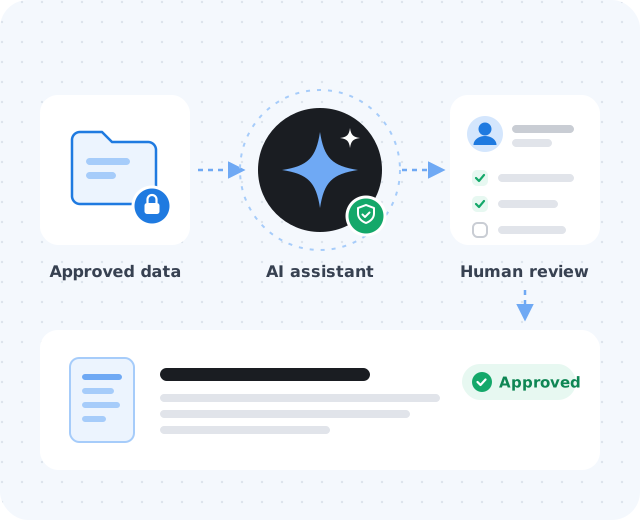
AI tools can be genuinely useful for small businesses. Problems show up when every employee experiments with different apps, sensitive information gets pasted into unknown systems, and no one knows who is responsible for reviewing results. A simple plan helps the business move faster while reducing avoidable risk.
- Keep sensitive information in the right place
- Reduce scattered tool usage and shadow IT
- Keep employees aligned on approved workflows
- Make AI-generated work easier to review and trust
- Connect AI with your security, Microsoft 365, and business processes
Start with one workflow.
Instead of applying AI everywhere at once, choose one practical workflow where the benefit is clear and the risk can be managed. Good first candidates:
Drafting internal documentation
Procedures, how-tos, and onboarding notes.
Summarizing non-sensitive meeting notes
Action items and recaps from routine meetings.
First-draft marketing ideas
Headlines, outlines, and campaign brainstorms.
Organizing support or ops checklists
Turning tribal knowledge into repeatable steps.
Searching approved internal knowledge
Helping staff find answers in vetted sources.
Define what data is allowed.
Staff need clear guidance on what can and cannot be entered into AI tools. Customer records, passwords, private financial details, health information, proprietary files, and confidential documents should be handled carefully and only with approved systems.
Review access, retention, and vendor settings.
Not every AI tool handles accounts, data retention, team controls, or training settings the same way. Understand how a tool stores information, who has access, and whether admin controls are available.
- Use business accounts, not unmanaged personal onesCompany work should live in accounts the company controls.
- Check data retention and model-training settingsKnow whether prompts are stored, for how long, and if they're used for training.
- Confirm admin visibility and access controlsSomeone should be able to add, remove, and audit users.
- Consider Microsoft 365 and identity integrationSingle sign-on and existing security policies reduce extra risk.
- Document which tools are approvedA short, current list beats a long policy nobody reads.
Create a review process.
AI output shouldn't automatically become final work. Teams should know who reviews AI-generated content, how accuracy is checked, and when a human decision is required.
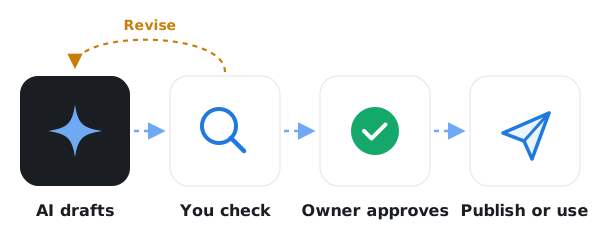
- Confirm facts and numbers
- Check tone, accuracy, and policy fit
- Review customer-facing content before publishing
- Get expert review for legal, HR, financial, or security decisions
- Keep accountability with the person who owns the work
Coordinate IT, leadership, and training.
A good AI rollout isn't just a software decision. IT, leadership, and staff should agree on approved tools, safe use, account settings, and basic training.
- Choose approved tools and use cases
- Set basic written rules
- Train staff on safe prompting and data handling
- Monitor adoption and adjust policies
- Revisit the plan as tools and business needs change