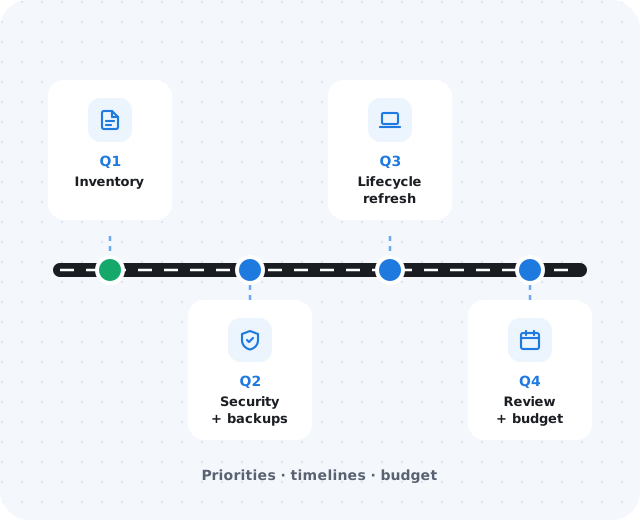
Why small businesses need a roadmap.
Many businesses make IT decisions only when something breaks — a workstation fails, a subscription renews unexpectedly, a security tool expires, or a key employee leaves and nobody knows who owns an account. That reactive approach leads to:
- Surprise replacement costs and duplicate subscriptions
- Unsupported systems and unclear administrator access
- Inconsistent onboarding
- Projects competing for attention at the wrong time
A roadmap helps leadership decide what happens next before everything becomes urgent.
Start with an inventory.
List what the business depends on: workstations, laptops, servers, network equipment, Microsoft 365 or Google Workspace, business applications, security tools, backups, internet service, phones, cloud storage, vendor contracts, and renewal dates. It does not need to be perfect on day one — just visible enough to support better decisions.
Identify aging or unsupported systems.
Look for old or out-of-warranty devices, unsupported operating systems, network gear with outdated firmware, software that no longer receives updates, shared accounts, and backups that have not been tested recently. Prioritize by business impact, not just age.
Prioritize by risk and productivity.
Not every issue needs fixing immediately. These questions help avoid random spending while still making steady progress:
What would stop the business?
Systems the business cannot operate without.
What affects customers or revenue?
Issues your clients would notice.
What creates security exposure?
Security or compliance gaps.
What gets costlier if delayed?
And what can wait for a slower season.
Include security and backup planning.
Security and recovery belong in the roadmap, not as afterthoughts. Review MFA, endpoint protection, email security, password management, user access, backup coverage, restore testing, incident contacts, and cyber insurance readiness.
Plan for lifecycle timing.
Replacing hardware only after failure creates unnecessary disruption. Include workstations, laptops, servers, firewalls, switches, and access points — and decide which to replace this year, which can wait, which users need better hardware, and what to budget before renewal season.
Review the roadmap regularly.
A roadmap is not written once and forgotten. Revisit it when:
- New employees are added or the office expands
- Software vendors change or hardware is replaced
- Security requirements change
- Recurring support issues appear
- Annual budgeting begins